
Tag: chatgpt

  • What Is Claude AI? A Beginner’s Guide (2026)

    What Is Claude AI? A Beginner’s Guide (2026)

    If you have heard people talking about Claude AI and thought it was another chatbot you are not the only one. A lot of people think that at first.. When you see Claude AI rewrite a document or summarize a really long report or help solve a coding problem in just a few minutes it is easy to see why Claude AI has become one of the most popular AI assistants.

    In this guide, for beginners you will learn what Claude AI is, how Claude AI works, what the key features of Claude AI are, how much Claude AI costs, what the advantages of using Claude AI are, what the limitations of Claude AI are and how to start using Claude AI.

    If you are looking for more AI tools you can compare ChatGPT vs Claude tools. You can visit my guide on ChatGPT Explained: A Beginner’s Guide (2026)

    If you want to explore both tools, read our Google Gemini AI Guide 2026 for Beginners to learn how Claude can support content creation and research.

    What Is Claude AI?

    Claude is a group of AI assisted models that can assist people made by a company called Anthropic. The people who started Anthropic used to work at OpenAI. They really want to make sure the computer programs they make are safe and work well.

    You can talk to Claude. It can help you with things like writing and editing. It can also summarize things for you. Answer your questions. Claude can even help you come up with ideas and assist with coding. You can use Claude on your computer, phone or tablet.

    Anthropic has made a few versions of Claude for different purposes.

    • Claude Opus is the one to use when you need to figure out something really complicated.
    • Claude Sonnet is a good around version that works well for most things like writing and coding.
    • Claude Haiku is the version and is good, for simple tasks that do not require a lot of work.

    How Do You Use Claude AI?

    Getting started is simple.

    1. Visit claude.ai.
    2. Create a free account.
    3. Start chatting by typing your question or request.

    You can type questions, paste text, upload documents, or share code. Claude responds within seconds, and you can continue the conversation by asking follow-up questions or requesting revisions.

    Some common prompts include:

    • “Rewrite this email in a more professional tone.”
    • “Explain compound interest like I’m 12 years old.”
    • “Summarize this PDF into five key points.”
    • “Review my resume and suggest improvements.”
    • “Help me fix this Python error.”

    For Example

    Imagine you’re a small business owner who has written rough notes for a company policy but doesn’t know how to organize them.

    Simply paste your notes into Claude and ask:

    “Turn these notes into a clear, friendly policy memo for my employees.”

    Claude creates a structured draft with headings and professional language. If you want changes, simply ask:

    • “Make it shorter.”
    • “Use simpler language.”
    • “Add bullet points.”
    • “Make the tone more friendly.”

    This conversational editing process is one of Claude’s biggest strengths.
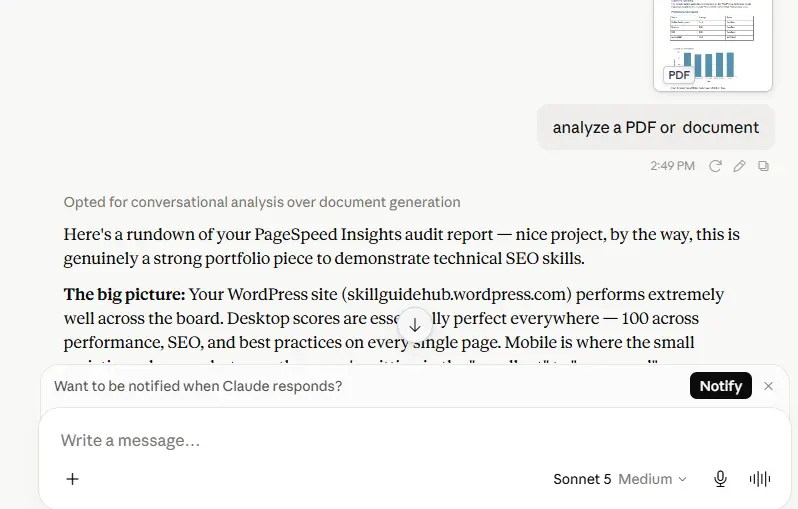
    Claude AI chat interface showing a conversation with the Anthropic AI assistant.

    What Can Claude AI Do?

    Claude is useful for many everyday tasks, including:

    Writing and Editing

    • Emails
    • Blog posts
    • Essays
    • Resumes
    • Reports
    • Social media captions

    Coding Assistance

    Claude can:

    • Explain code
    • Debug errors
    • Write code snippets
    • Review existing code
    • Help developers solve programming problems

    Anthropic also offers Claude Code, designed specifically for developers who want AI assistance inside their coding workflow.

    Research and Summarization

    Claude can summarize:

    • PDFs
    • Reports
    • Research papers
    • Meeting notes
    • Long articles

    It can quickly identify the main ideas and organize information into easy-to-read summaries.

    Data Analysis

    Upload spreadsheets or data files and ask questions in plain English instead of writing complicated formulas.

    Brainstorming

    Claude is useful for generating ideas for:

    • Content creation
    • Business planning
    • Marketing campaigns
    • Study notes
    • Project planning

    Claude AI vs Other AI Chatbots

    FeatureClaudeChatGPTGemini
    Writing QualityExcellentExcellentVery Good
    Coding AssistanceExcellentExcellentVery Good
    Document AnalysisYesYesYes
    Image UnderstandingYesYesYes
    Free VersionYesYesYes

    I think each AI assistant has its strengths. Claude is really good, at writing responses analyzing documents and helping with coding tasks.

    ChatGPT and Goolge Gemini are also popular they offer features and work well with other tools. Claudes writing and coding skills are really helpful. ChatGPT and Gemini have their strengths too.

    Advantages of Claude AI

    • Easy to use
    • Natural, human-like writing
    • Excellent document summarization
    • Strong coding support
    • Supports file uploads
    • Handles long conversations well
    • Available on web, desktop, and mobile

    Limitations of Claude AI

    Although Claude is powerful, it has some limitations:

    • It may occasionally provide incorrect or outdated information.
    • Free accounts have daily usage limits.
    • Internet access depends on the plan and available features.
    • It should not replace professional legal, medical, or financial advice.
    • AI-generated content should always be reviewed before publishing.

    Is Claude AI Free?

    Yes. Claude has a plan that lets you try out its features without using a credit card.

    If you need to use Claude and you want to use the better models you can pay for plans like Claude Pro. Anthropic also has plans that cost more for people who use it a lot for teams and, for businesses. You should look at Anthropics pricing page to get the information because the prices and features can change.

    Tips for Using Claude Effectively

    To get better responses:

    • Be specific with your prompts.
    • Provide enough background information.
    • Upload documents instead of copying large amounts of text.
    • Ask follow-up questions to improve responses.
    • Verify important facts before relying on AI-generated content.

    Getting Started

    If you’re trying Claude for the first time, begin with a real task you’re currently working on.

    For example:

    • Rewrite an email.
    • Summarize a PDF.
    • Improve your resume.
    • Fix a coding error.
    • Brainstorm blog ideas.

    The more context you provide, the more useful Claude’s responses become.

    Key Takeaways

    • Claude AI is an AI assistant developed by Anthropic.
    • It helps with writing, coding, document analysis, brainstorming, and research.
    • It supports natural conversations and file uploads.
    • Both free and paid plans are available.
    • Always review AI-generated information before using it for important decisions.

    Conclusion

    I believe that Claude AI tool is not magic. It is a very good tool that can help people be more productive. Whether you are a student or a professional or a writer or a developer or a business owner Claude AI can help you save time by assisting you with things, like writing and research and coding and things you do every day.

    The best way to understand how Claude AI works is to try using it for yourself. You should give Claude AI a task to do and then try giving it more instructions to see what it can do. You will quickly see how Claude AI can be a part of your routine and help you with your work.

    Frequently Asked Questions

    What is Claude AI used for?

    Claude AI is used for writing, editing, coding, document summarization, research, brainstorming, and answering questions through natural conversation.

    Is Claude better than ChatGPT?

    Neither is universally better. Claude is known for thoughtful writing and document analysis, while ChatGPT offers a broad ecosystem of features and integrations. The best choice depends on your specific needs.

    Do I need coding knowledge to use Claude?

    No. Claude is designed for everyone. You can use it for writing, learning, research, and everyday tasks without any programming experience.

    Is Claude AI free to use?

    Yes. Claude offers a free plan with daily usage limits. Paid plans provide higher limits and access to more advanced models.

    Is Claude AI safe to use?

    Claude is designed with a strong focus on safety. However, you should avoid sharing highly sensitive personal, financial, or confidential information with any AI chatbot unless appropriate privacy protections are in place.

    What makes Claude different from other AI chatbots?

    Claude is developed by Anthropic with an emphasis on safety, thoughtful responses, strong writing quality, document analysis, and coding assistance. Many users appreciate its balanced and conversational style.

  • ChatGPT Explained: A Beginner’s Guide (2026)

    ChatGPT Explained: A Beginner’s Guide (2026)

    Artificial intelligence tools are becoming a part of everyday life, and ChatGPT is one of the most popular AI assistants available today. Whether you’re a student, professional, freelancer, or just curious about AI, learning how to use ChatGPT can help you save time, boost productivity, and spark new ideas.

    In this article I will tell you what ChatGPT is, how to get started, and practical tips for using it effectively.

    1. What is ChatGPT?
    2. How to Create a ChatGPT Account?
    3. How is the ChatGPT Interface looklike?
    4. What is a Prompt in ChatGPT?
    5. How to Write Better Prompts?
    6. What are Practical Ways to Use ChatGPT?
      1. 1. Learn New Skills
      2. 2. Study More Efficiently
      3. 3. Improve Writing
      4. 4. Brainstorm Ideas
      5. 5. Coding Assistance
      6. 6. Create Content
      7. 7. Translation
      8. 8. Productivity Assistance
      9. 9. Career Support
      10. 10. Personal Learning
    7. Common Mistakes Beginners Make
    8. ChatGPT Free vs Paid Plans
      1. Free Plan
      2. Paid Plans
    9. Tips for Getting Better Results
    10. Frequently Asked Questions
      1. Is ChatGPT free to use?
      2. Can ChatGPT replace Google Search?
      3. Is ChatGPT good for students?
      4. Can ChatGPT help with coding?
    11. Conclusion

    What is ChatGPT?

    ChatGPT is an AI-powered chatbot developed by OpenAI. It can understand questions and generate human-like responses. You can use it to:

    • Answer questions
    • Write emails and articles
    • Summarize documents
    • Generate ideas
    • Learn new topics
    • Practice coding
    • Translate text
    • Create study notes

    ChatGPT works through natural language, which means you can communicate with it just as you would with another person.

    How to Create a ChatGPT Account?

    Getting started with ChatGPT is simple:

    1. Visit the ChatGPT website.
    2. Create an account using your email address or sign in with Google or Apple.
    3. Choose the free plan or upgrade to a paid subscription if you need additional features.
    4. Start a new chat and type your question.

    No technical knowledge is required.

    How is the ChatGPT Interface looklike?

    The interface is easy to use:

    Chat Box

    This is where you type your questions or prompts.

    New Chat

    Start a fresh conversation whenever you want.

    Chat History

    Access previous conversations and continue where you left off.

    Settings

    Customize your experience and manage preferences.

    What is a Prompt in ChatGPT?

    A prompt is simply the instruction or question you give to ChatGPT.

    Examples:

    • Explain SEO in simple words.
    • Write a professional email.
    • Create a weekly study schedule.
    • Summarize this article.
    • Give me Excel formulas for beginners.

    The quality of your prompt often determines the quality of the answer.

    How to Write Better Prompts?

    Follow these simple tips:

    Be Specific

    Instead of:

    “Tell me about SEO.”

    Try:

    “Explain SEO for beginners with examples.”

    Add Context

    Instead of:

    “Write an email.”

    Try:

    “Write a polite email asking for a project update.”

    Specify the Format

    Examples:

    • Create a table.
    • Use bullet points.
    • Explain step by step.
    • Write in simple English.

    What are Practical Ways to Use ChatGPT?

    1. Learn New Skills

    Ask ChatGPT to explain topics like:

    • SEO
    • Excel
    • SQL
    • Python
    • Digital marketing

    2. Study More Efficiently

    Students can:

    • Summarize notes
    • Create flashcards
    • Generate quiz questions
    • Explain difficult concepts

    3. Improve Writing

    Use ChatGPT to:

    • Write emails
    • Create reports
    • Correct grammar
    • Rewrite content

    4. Brainstorm Ideas

    Generate ideas for:

    • Blog posts
    • YouTube videos
    • Business names
    • Social media captions

    5. Coding Assistance

    Developers can ask for:

    • Code examples
    • Debugging help
    • SQL queries
    • Python scripts

    6. Create Content

    ChatGPT can help create:

    • Articles
    • Product descriptions
    • Marketing copy
    • Scripts

    7. Translation

    Translate text into multiple languages while preserving meaning.

    8. Productivity Assistance

    Generate:

    • To-do lists
    • Daily schedules
    • Project plans
    • Meeting notes

    9. Career Support

    Use ChatGPT to:

    • Improve resumes
    • Write cover letters
    • Prepare for interviews

    10. Personal Learning

    Ask questions about:

    • History
    • Science
    • Technology
    • Finance
    • Health and fitness

    Common Mistakes Beginners Make

    • Asking Very Short Questions
    • Short prompts often produce vague answers.
    • Expecting Perfect Accuracy
    • AI can make mistakes. Always verify important information.
    • Not Providing Context
    • More details usually produce better results.
    • Ignoring Follow-Up Questions
    • You can continue the conversation and refine answers instead of starting over.

    ChatGPT Free vs Paid Plans

    Free Plan

    Suitable for:

    • Casual users
    • Students
    • Basic tasks

    Offer:

    • Faster responses
    • More advanced AI models
    • Additional features
    • Better performance for complex tasks

    For most beginners, the free plan is enough to get started.

    Tips for Getting Better Results

    • Use clear instructions.
    • Break complex tasks into smaller parts.
    • Ask follow-up questions.
    • Request examples.
    • Specify tone and style.
    • Double-check important facts.

    The more specific your prompts are, the more useful the responses become.

    Frequently Asked Questions

    Is ChatGPT free to use?

    Yes. A free version is available, along with paid plans that provide additional features.

    Not entirely. ChatGPT is excellent for explanations and content generation, while search engines are better for finding current information and websites.

    Is ChatGPT good for students?

    Yes. Students can use it for studying, note-taking, explanations, and brainstorming ideas.

    Can ChatGPT help with coding?

    Yes. It can explain programming concepts, generate code examples, and assist with debugging.

    Conclusion

    ChatGPT is a powerful AI assistant that helps beginners learn, create, and work more efficiently. By writing clear prompts and exploring various use cases, you can unlock its full potential and simplify everyday tasks.

    Whether you’re a student, freelancer, or professional, mastering ChatGPT in 2026 is a valuable skill that boosts productivity and supports continuous learning.

    Would you like me to help you add tips on crafting effective prompts or examples of ChatGPT applications?

  • Best Free AI Tools for Students (2026 Guide)

    Best Free AI Tools for Students (2026 Guide)

    Artificial Intelligence (AI) is transforming the way students learn, research, and complete academic tasks. From writing assistance to research support and design tools, AI can save time and improve productivity. In this article, we will take a look at some of the top free AI tools for students in 2026.

    1. 1. ChatGPT
    2. 2. Google Gemini
    3. 3. Claude AI
    4. 4. Grammarly
    5. 5. Canva AI
    6. 6. Perplexity AI
    7. 1. What are AI tools for students?
    8. 2. Are free AI tools good for students?
    9. 3. Which free AI tools are best for students in 2026?
    10. 4. Can AI tools help with homework?
    11. 5. Do AI tools support coding and programming?
    12. 6. Are AI tools safe to use for students?

    1. ChatGPT

    ChatGPT owned by Open AI is one of the most widely used AI tools globally. It helps students with:

    • Writing assignments and essays
    • Explaining difficult concepts in easy way
    • Generating ideas for projects
    • Coding support

    It works like a personal assiatant available for study available anytime.

    2. Google Gemini

    Google Gemini is an advanced AI tool developed by Google.

    It is useful for:

    • Research and information gathering
    • Summarizing topics
    • Answering academic questions
    • Integrating with Google services

    It is especially helpful for students who already use google services.

    3. Claude AI

    Claude, developed by Anthropic, is known for its natural and clear writing style. Students use it for:

    • Writing long-form content
    • Summarizing notes and documents
    • Understanding difficult topics
    • Generating structured answers

    It is often preferred for detailed explanations and reading heavy study materials.

    4. Grammarly

    Grammarly is AI assisted model that helps to improve writing quality by checking:

    • Grammar mistakes
    • Spelling errors
    • Sentence clarity
    • Tone and readability

    It is useful for assignments, emails, and academic writing.

    5. Canva AI

    Canva AI helps students to create professional designs easily:

    • Presentations
    • Posters
    • Project reports
    • Social media infographics
    • Whiteboards
    • Worksheet

    6. Perplexity AI

    Perplexity AI is a research-focused AI tool that acts like a personal tutor and research buddy to students.

    It is useful for:

    • Academic research
    • Homework & Problem Solving
    • To summarise study material
    • Learning new topics efficiently
    • To organize study materials at one place

    It is especially useful for quick and accurate information gathering.

    Conclusion

    AI tools like ChatGPT, Google Gemini, Claude AI, and others are becoming primary important for modern students. Learning how to use them effectively can help improve productivity, save time, and enhance learning outcomes.

    For Instance Student who want to generate report for project can take help of AI tool but in a smart way like for presenting , getting ideas not creating whole project by giving prompt to AI tool.

    Using these tools wisely gives students a strong advantage in academics and future careers.

    FAQ – Best Free AI Tools for Students (2026 Guide)

    1. What are AI tools for students?

    AI tools help students with tasks such as writing, research, studying, note-taking, coding, presentations, and improving productivity.

    2. Are free AI tools good for students?

    Yes. Many free AI tools offer useful features for learning, brainstorming, summarizing, and completing academic tasks without any cost.

    3. Which free AI tools are best for students in 2026?

    Popular free AI tools include ChatGPT, Google Gemini, Microsoft Copilot, Claude, and Perplexity AI.

    4. Can AI tools help with homework?

    Yes. AI tools can explain concepts, solve practice problems, and provide study guidance. However, students should use them to learn rather than simply copy answers.

    5. Do AI tools support coding and programming?

    Yes. Many AI tools can help write, explain, debug, and optimize code in languages such as Python, Java, C++, SQL, and JavaScript.

    6. Are AI tools safe to use for students?

    Most reputable AI tools are safe when used responsibly. Avoid sharing personal or sensitive information, and always verify AI-generated content for accuracy.