
If you have heard people talking about Claude AI and thought it was another chatbot you are not the only one. A lot of people think that at first.. When you see Claude AI rewrite a document or summarize a really long report or help solve a coding problem in just a few minutes it is easy to see why Claude AI has become one of the most popular AI assistants.
In this guide, for beginners you will learn what Claude AI is, how Claude AI works, what the key features of Claude AI are, how much Claude AI costs, what the advantages of using Claude AI are, what the limitations of Claude AI are and how to start using Claude AI.
If you are looking for more AI tools you can compare ChatGPT vs Claude tools. You can visit my guide on ChatGPT Explained: A Beginner’s Guide (2026)
If you want to explore both tools, read our Google Gemini AI Guide 2026 for Beginners to learn how Claude can support content creation and research.
What Is Claude AI?
Claude is a group of AI assisted models that can assist people made by a company called Anthropic. The people who started Anthropic used to work at OpenAI. They really want to make sure the computer programs they make are safe and work well.
You can talk to Claude. It can help you with things like writing and editing. It can also summarize things for you. Answer your questions. Claude can even help you come up with ideas and assist with coding. You can use Claude on your computer, phone or tablet.
Anthropic has made a few versions of Claude for different purposes.
- Claude Opus is the one to use when you need to figure out something really complicated.
- Claude Sonnet is a good around version that works well for most things like writing and coding.
- Claude Haiku is the version and is good, for simple tasks that do not require a lot of work.
How Do You Use Claude AI?
Getting started is simple.
- Visit claude.ai.
- Create a free account.
- Start chatting by typing your question or request.
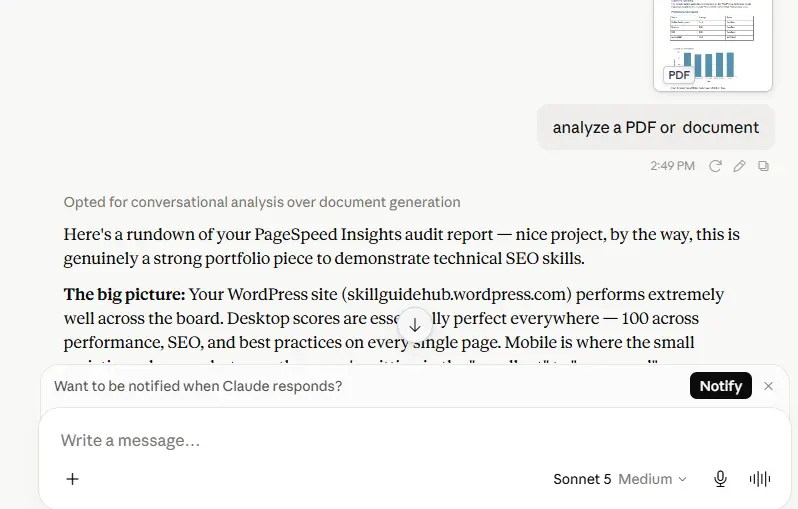
You can type questions, paste text, upload documents, or share code. Claude responds within seconds, and you can continue the conversation by asking follow-up questions or requesting revisions.
Some common prompts include:
- “Rewrite this email in a more professional tone.”
- “Explain compound interest like I’m 12 years old.”
- “Summarize this PDF into five key points.”
- “Review my resume and suggest improvements.”
- “Help me fix this Python error.”
For Example
Imagine you’re a small business owner who has written rough notes for a company policy but doesn’t know how to organize them.
Simply paste your notes into Claude and ask:
“Turn these notes into a clear, friendly policy memo for my employees.”
Claude creates a structured draft with headings and professional language. If you want changes, simply ask:
- “Make it shorter.”
- “Use simpler language.”
- “Add bullet points.”
- “Make the tone more friendly.”
This conversational editing process is one of Claude’s biggest strengths.
What Can Claude AI Do?
Claude is useful for many everyday tasks, including:
Writing and Editing
- Emails
- Blog posts
- Essays
- Resumes
- Reports
- Social media captions
Coding Assistance
Claude can:
- Explain code
- Debug errors
- Write code snippets
- Review existing code
- Help developers solve programming problems
Anthropic also offers Claude Code, designed specifically for developers who want AI assistance inside their coding workflow.
Research and Summarization
Claude can summarize:
- PDFs
- Reports
- Research papers
- Meeting notes
- Long articles
It can quickly identify the main ideas and organize information into easy-to-read summaries.
Data Analysis
Upload spreadsheets or data files and ask questions in plain English instead of writing complicated formulas.
Brainstorming
Claude is useful for generating ideas for:
- Content creation
- Business planning
- Marketing campaigns
- Study notes
- Project planning
Claude AI vs Other AI Chatbots
| Feature | Claude | ChatGPT | Gemini |
|---|---|---|---|
| Writing Quality | Excellent | Excellent | Very Good |
| Coding Assistance | Excellent | Excellent | Very Good |
| Document Analysis | Yes | Yes | Yes |
| Image Understanding | Yes | Yes | Yes |
| Free Version | Yes | Yes | Yes |
I think each AI assistant has its strengths. Claude is really good, at writing responses analyzing documents and helping with coding tasks.
ChatGPT and Goolge Gemini are also popular they offer features and work well with other tools. Claudes writing and coding skills are really helpful. ChatGPT and Gemini have their strengths too.
Advantages of Claude AI
- Easy to use
- Natural, human-like writing
- Excellent document summarization
- Strong coding support
- Supports file uploads
- Handles long conversations well
- Available on web, desktop, and mobile
Limitations of Claude AI
Although Claude is powerful, it has some limitations:
- It may occasionally provide incorrect or outdated information.
- Free accounts have daily usage limits.
- Internet access depends on the plan and available features.
- It should not replace professional legal, medical, or financial advice.
- AI-generated content should always be reviewed before publishing.
Is Claude AI Free?
Yes. Claude has a plan that lets you try out its features without using a credit card.
If you need to use Claude and you want to use the better models you can pay for plans like Claude Pro. Anthropic also has plans that cost more for people who use it a lot for teams and, for businesses. You should look at Anthropics pricing page to get the information because the prices and features can change.
Tips for Using Claude Effectively
To get better responses:
- Be specific with your prompts.
- Provide enough background information.
- Upload documents instead of copying large amounts of text.
- Ask follow-up questions to improve responses.
- Verify important facts before relying on AI-generated content.
Getting Started
If you’re trying Claude for the first time, begin with a real task you’re currently working on.
For example:
- Rewrite an email.
- Summarize a PDF.
- Improve your resume.
- Fix a coding error.
- Brainstorm blog ideas.
The more context you provide, the more useful Claude’s responses become.
Key Takeaways
- Claude AI is an AI assistant developed by Anthropic.
- It helps with writing, coding, document analysis, brainstorming, and research.
- It supports natural conversations and file uploads.
- Both free and paid plans are available.
- Always review AI-generated information before using it for important decisions.
Conclusion
I believe that Claude AI tool is not magic. It is a very good tool that can help people be more productive. Whether you are a student or a professional or a writer or a developer or a business owner Claude AI can help you save time by assisting you with things, like writing and research and coding and things you do every day.
The best way to understand how Claude AI works is to try using it for yourself. You should give Claude AI a task to do and then try giving it more instructions to see what it can do. You will quickly see how Claude AI can be a part of your routine and help you with your work.
Frequently Asked Questions
What is Claude AI used for?
Claude AI is used for writing, editing, coding, document summarization, research, brainstorming, and answering questions through natural conversation.
Is Claude better than ChatGPT?
Neither is universally better. Claude is known for thoughtful writing and document analysis, while ChatGPT offers a broad ecosystem of features and integrations. The best choice depends on your specific needs.
Do I need coding knowledge to use Claude?
No. Claude is designed for everyone. You can use it for writing, learning, research, and everyday tasks without any programming experience.
Is Claude AI free to use?
Yes. Claude offers a free plan with daily usage limits. Paid plans provide higher limits and access to more advanced models.
Is Claude AI safe to use?
Claude is designed with a strong focus on safety. However, you should avoid sharing highly sensitive personal, financial, or confidential information with any AI chatbot unless appropriate privacy protections are in place.
What makes Claude different from other AI chatbots?
Claude is developed by Anthropic with an emphasis on safety, thoughtful responses, strong writing quality, document analysis, and coding assistance. Many users appreciate its balanced and conversational style.